

Command Reception and Confirmation
Basic Command Integration Flow
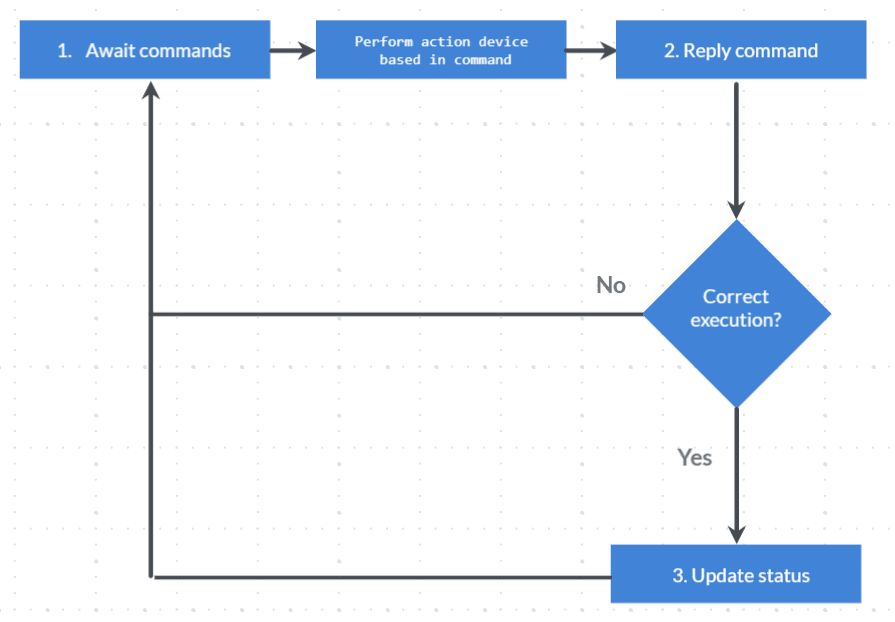
Basic command integration flow
The gateway, device, or endpoint must be listening for commands by executing the corresponding method. A long polling mechanism is used for this, where the request remains on the server side for a defined amount of time and returns with the response either when the specified time has elapsed or when a command execution has been detected.
This response must be interpreted by the device, the corresponding actions must be performed, and a response must be sent through the command response method to report whether the execution was successful or not.
If successful, the method to update the device status must be executed accordingly.
Finally, ensure that command listening continues with the first method mentioned.
1. Wait for Commands
Commands can be listened to at 3 levels:
- At the Gateway level
- At the Device level
- At the Endpoint level
These commands must be called cyclically to constantly listen for executed commands.
Endpoint Commands
The WaitForCommand_Endpoint method must be called via HTTP POST:
POST /services/gear/DeviceIntegrationService.svc/WaitForCommand_Endpoint HTTP/1.1
Host: gear-dev.cloud.studio
Content-Type: application/json

{
    "accessToken": "",
    "endpointID": 1,
    "timeoutSeconds": 60
}
Parameters
| Name | Description | Data Type |
|---|---|---|
| accessToken | Unique Access Token | text |
| endpointID | Unique endpoint identifier, obtained from the Manager | numeric |
| timeoutSeconds | Time in seconds the server will wait before returning the response if no commands have been detected | numeric |
Response
The response is a list within the WaitForCommand_EndpointResult property that will contain each of the corresponding commands:
{
   "WaitForCommand_EndpointResult":[
      {
         "Closure":null,
         "CommandID":1120907993,
         "CommandType":1,
         "Custom":null,
         "DeviceID":7246,
         "Dimmer":null,
         "EndpointID":113139,
         "Management":null,
         "OnOff":{
            "AutomaticOverrideMinutes":0,
            "CommandType":1
         },
         "Thermostat":null
      }
   ]
}
For more information about the response properties, see the documentation.
Depending on the type of command executed, the corresponding property must be considered to determine the action to perform.
For example, if the CommandType is 1, it means it is a command for an "Appliance" type endpoint. Therefore, the information in the OnOff property must be considered.
The different command types can be found in this documentation.
2. Respond to a Command
If a command has been received with any of the WaitForCommands_* methods and after executing the corresponding actions on the endpoint (hardware), the command must be responded to whether it succeeded or failed.
To report that the command has been executed, call the following method:
POST /services/gear/DeviceIntegrationService.svc/RespondCommand HTTP/1.1
Host: gear-dev.cloud.studio
Content-Type: application/json

{
    "accessToken": "",
    "response":{
        "CommandID": 1120907993,
        "ResponseType": 0,
        "ErrorCode": "",
        "ErrorMessage": "",
        "ResponseData": "ok"
    }
}
The CommandID must correspond to the one obtained from the corresponding command wait method. The ResponseType must be one of the enum values, as appropriate. In this case it is 0, which means "success".
3. Update Endpoint Status
If the command execution was successful, the new endpoint status must be reported. To do this, use the corresponding method for the endpoint type.
Following the appliance example, call the following method:
POST /services/gear/DeviceIntegrationService.svc/UpdateApplianceStatus HTTP/1.1
Host: gear-dev.cloud.studio
Content-Type: application/json

{
    "accessToken": "",
    "endpointID": 1,
    "isOn": true
}
For more information about this method, see the on/off appliances section.
Última atualização em