

Benutzerdefinierte Filter
Within the History Widget, you can use the Benutzerdefinierte Filter option to adapt the view according to your needs. This feature allows you to select from different preloaded filters and apply them to refine the displayed information.
Preloaded Filters are preconfigured sets of filtering criteria that facilitate the quick selection and application of specific filters without having to configure each criterion manually.
In the History Widget, check the 'enable custom filters' option.
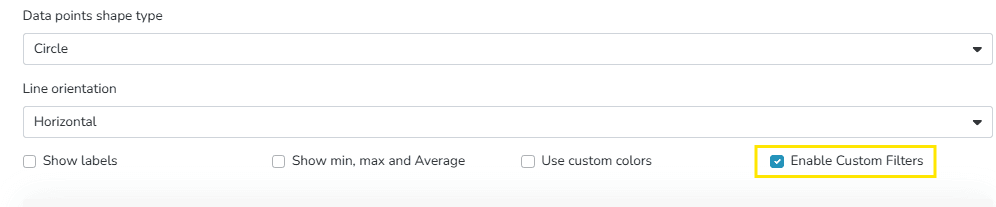
This enables the section to choose filters.
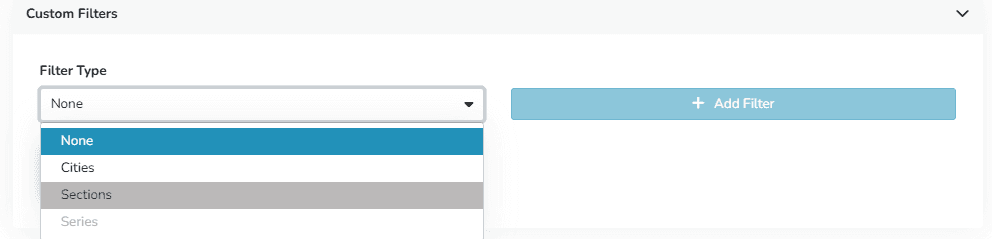
Once selected, they are displayed as follows within the widget:
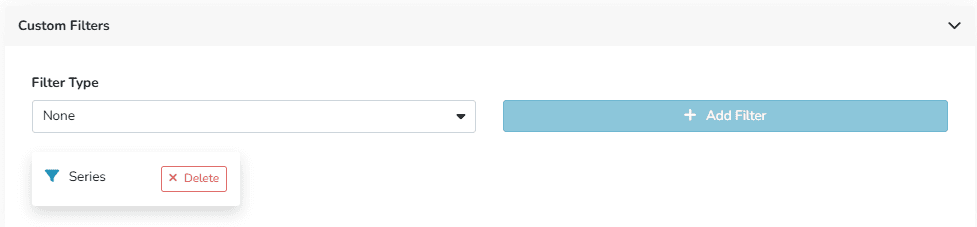
The widget view will update automatically, showing only the information that meets the selected filter criteria.
Its benefits include:
- More relevant information visualization
- Combination of filters for more specific results
- Easy to apply
Zuletzt aktualisiert am
Verlauf – Trennungszeit
Es gibt Situationen, in denen ein Gerät die Verbindung trennt, aber weiterhin Messungen generiert werden. Wenn das Gerät die Verbindung wiederherstellt, werden die gespeicherten Messungen von diesem Gerät automatisch mit dem System synchronisiert, sodass der Benutzer die vollständige Datensequenz ohne manuellen Eingriff einsehen kann.
Metriken
Eine Metrik ist eine quantitative Messgröße, die zur Bewertung und Überwachung der Leistung eines IoT-Systems oder Geräts in Echtzeit verwendet wird. Metriken werden eingesetzt, um Daten zu sammeln, die analysiert werden können, um wertvolle Einblicke in das Verhalten und die Effektivität des IoT-Geräts zu gewinnen.