

Mapa de Facilities
Introdução
O mapa de facilities permite visualizar todas as facilities do cliente para as quais o usuário tem permissões.
Habilitando o mapa de facilities
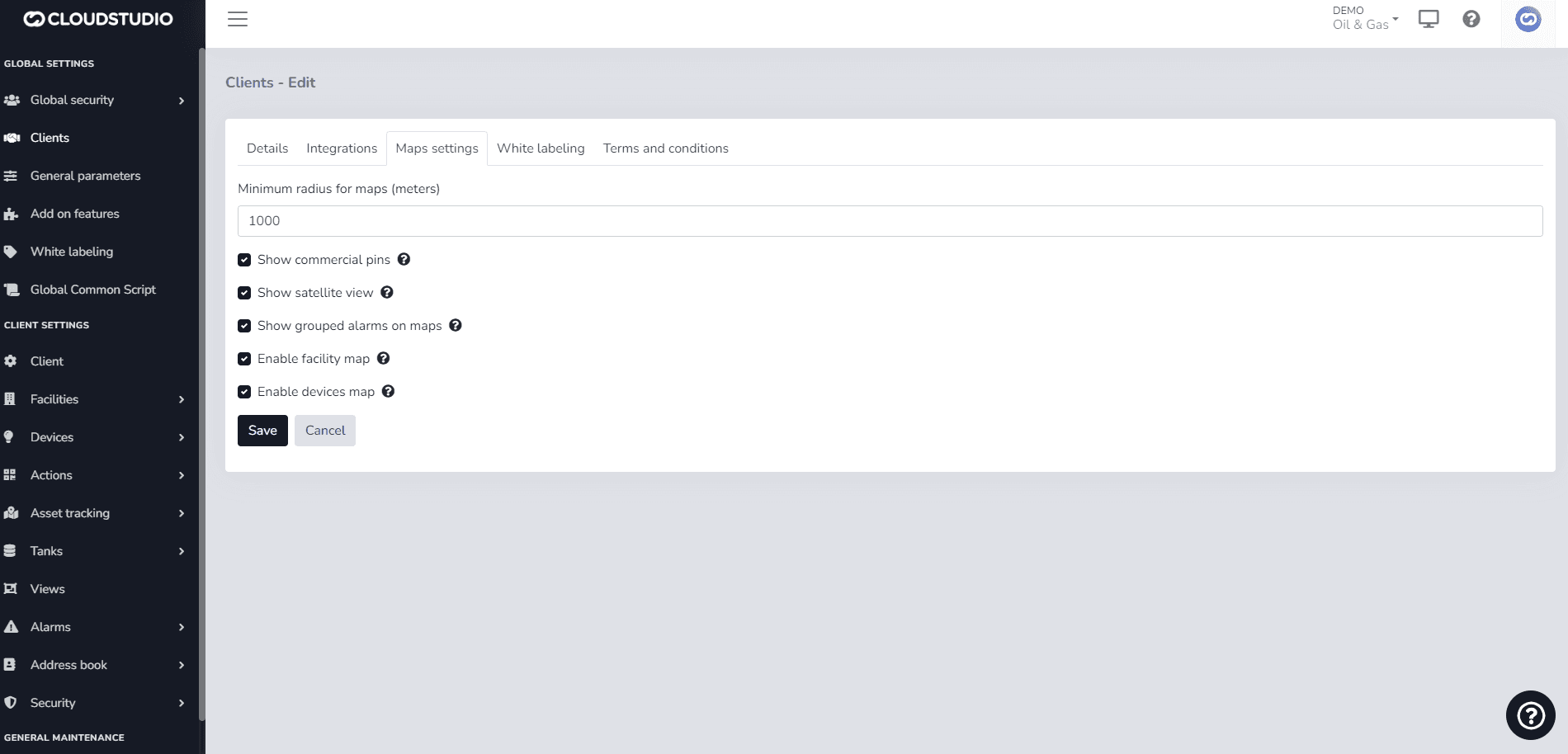
Para habilitar esta funcionalidade e exibir a tela de facilities no monitor, é necessário configurar a permissão do cliente marcando a opção "Habilitar mapa de facilities" como mostrado na imagem a seguir.
O painel lateral lista todas as facilities do cliente e mostra o status de cada facility com base nos alarmes. Ele fornece acesso rápido às visualizações, painel, endpoints e alarmes de cada facility.
{/_ Imagem pendente _/}
Última atualização em
Mapa de Dispositivos
O mapa de dispositivos permite visualizar todos os dispositivos do cliente para os quais o usuário tem permissões. Para habilitar esta funcionalidade e exibir a tela de dispositivos no monitor, é necessário configurar a permissão marcando a opção "Habilitar mapa de dispositivos" como mostrado na imagem a seguir.
Dashboards
A Dashboard is a graphical screen designed to present data and information in a visual, quick, and clear manner. Dashboards help users make data-driven decisions from multiple sources.