

Edit a Contact
To EDIT a contact in the address book, expand the three-dot menu that appears to the right of the contact to edit. This menu shows two options: Edit and Delete.
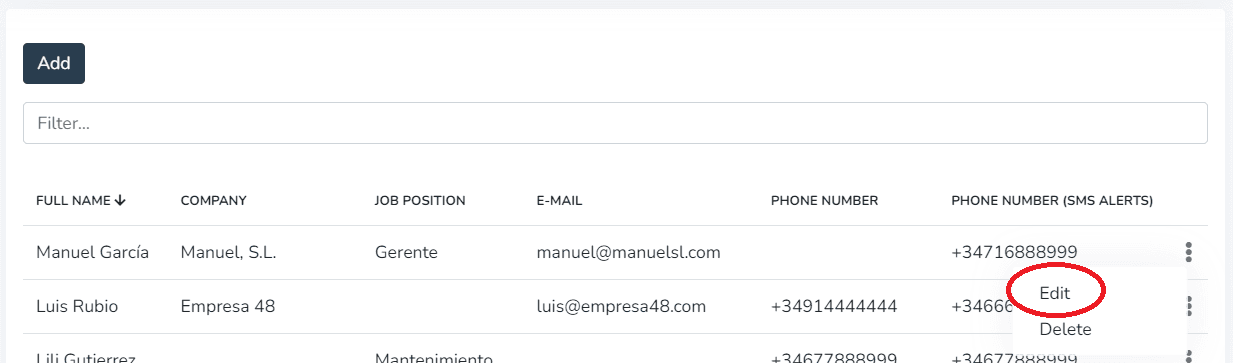
点击 on the EDIT option in the menu and a screen will open with the contact's data ready to be changed or updated.
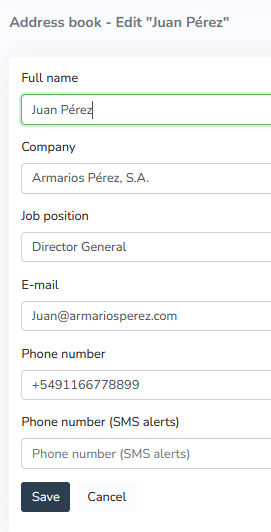
IMPORTANT: Do not leave required fields empty.
Once the necessary changes have been made and saved by 点击ing the "Save" button, the contact will appear in the address book list with the applied corrections.
If the goal is to DELETE the 选择ed contact, 点击ing "Delete" will display a confirmation message before permanently deleting the contact.
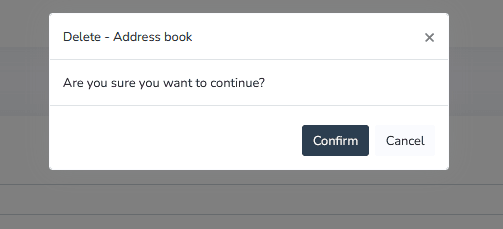
点击ing the "Confirm" button will permanently delete the contact without the possibility of recovery.
点击ing the "Cancel" button will leave the contact unchanged.
更多信息
最后更新于
Create a New Contact
To create a new contact in the 通讯录, simply 点击 the "Add" button that appears on the contact creation screen. It is also possible to add contacts with the text box filter active...
Create a New Contact Group
To create a new contact group in the 通讯录, go to Client 配置 > 通讯录 > Contact 组. 按下 add and the following screen will open...