

Partager le tableau de bord - App mobile
The user can use the corresponding icon to share the Dashboard.
When accessing the Dashboard from the Dashboard List and editing is required, the Share option will not be enabled until edit mode is closed.
1- Share Dashboard: Select the Share Dashboard option.

This opens a message indicating that a unique link is generated that can be accessed without credentials. An optional description can also be provided.
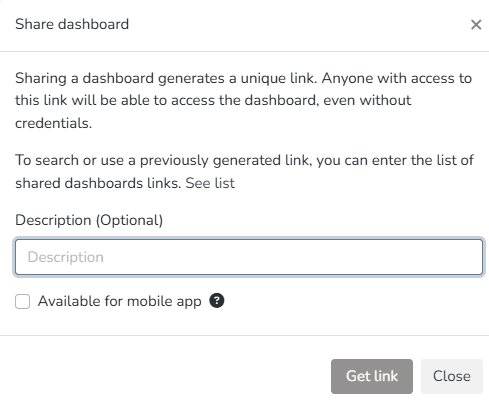
Once the Get Link button is pressed, an access link to the dashboard you want to share is generated.
The link can be opened and viewed in a browser without needing access to the platform.
2- Share Dashboard - Mobile: Select the Share Dashboard option.
This opens a message indicating that a unique link is generated that can be accessed without credentials. An optional description can also be provided.
To make it available in the mobile version, check the 'Available for the mobile application' option.
Once the Get Link button is pressed, an access link to the dashboard you want to share is generated.
The link can be opened and viewed in a browser without needing access to the platform, as well as on a mobile device.
3- Access to shared links
You can access and manage shared links. To do this, go through the manager with the required permissions. Navigate to Security > Shared Links.
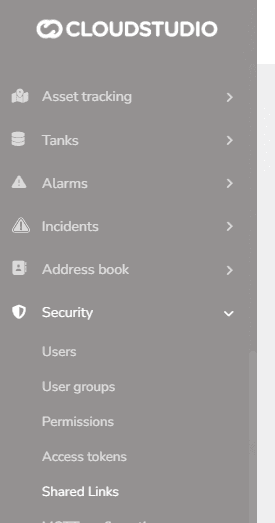
Once there, all previously shared links are displayed with the following information: Description, Facility, link, user who shared it, creation date, last used date, and expiration date.
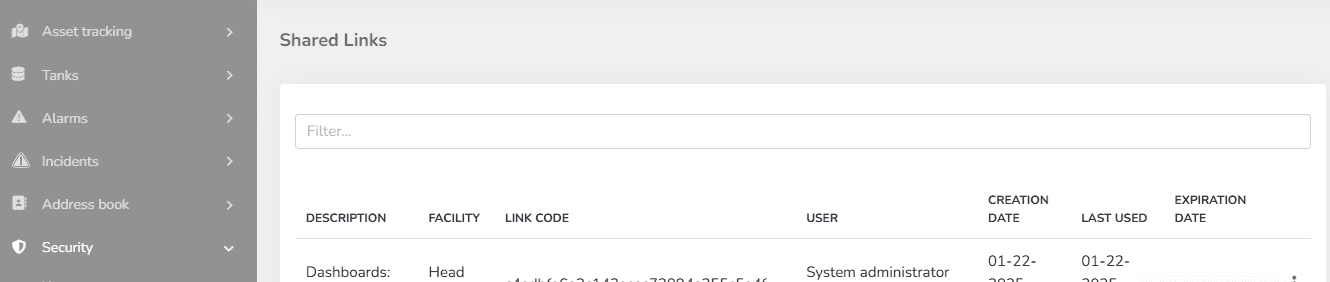
Through the context menu, you can either open the previously created link or expire it, provided you have the necessary permissions.
Dernière mise à jour le
Partager le tableau de bord
L'utilisateur peut utiliser l'icône correspondante pour partager le tableau de bord et/ou le télécharger dans deux formats. Lors de l'accès au tableau de bord depuis la liste des tableaux de bord et que l'édition est requise, l'option Partager ne sera pas activée tant que le mode d'édition n'est pas fermé.
Liste des tableaux de bord
Depuis cette section, l'utilisateur peut gérer tous les tableaux de bord qu'il a créés. Depuis l'option Tableaux de bord et en sélectionnant l'icône indiquée ci-dessous, la liste des tableaux de bord est accessible.