

Obtenir la dernière donnée de plusieurs endpoints
This service allows querying the latest recorded data from up to 5 devices at the same time, using a single call.
Its use is primarily recommended when you need to display real-time information from multiple sensors simultaneously, avoiding a specific call for each one, resulting in time savings and reduced network traffic.
To use this function, make a call to the API through a specific address using the GET method.
GET /api/v2/endpointData/multiple
For security purposes, an access key identifying the requesting user is required. This key is the Access Token and must be included as part of the address.
GET https://gear-dev.cloud.studio/api/v2/endpointData/multiple?accessToken=123456789-1110-0022-3333-987654321012&endpointIds=351031,151040,252340,511088,720510If the access key is missing or invalid, the API will return an error. This error is 401, indicating unauthorized access.
The required parameters are:
- Access Key (Access Token): Key identifying an authorized user.
- It is a String type and is mandatory.
- EndpointsIDs: IDs of the device sensors separated by commas, for which data should be retrieved.
- It is a List type and is mandatory.
- NOTE: The limit of endpoints per call is 5 (five).
When more than 5 endpointIds are sent in the request, a 400 error will be received, indicating Bad Request, meaning the endpoint limit has been exceeded.
Once the request is correctly made, a list of objects (JSON) is received. Each object in the list will represent the information of one of the requested sensors.
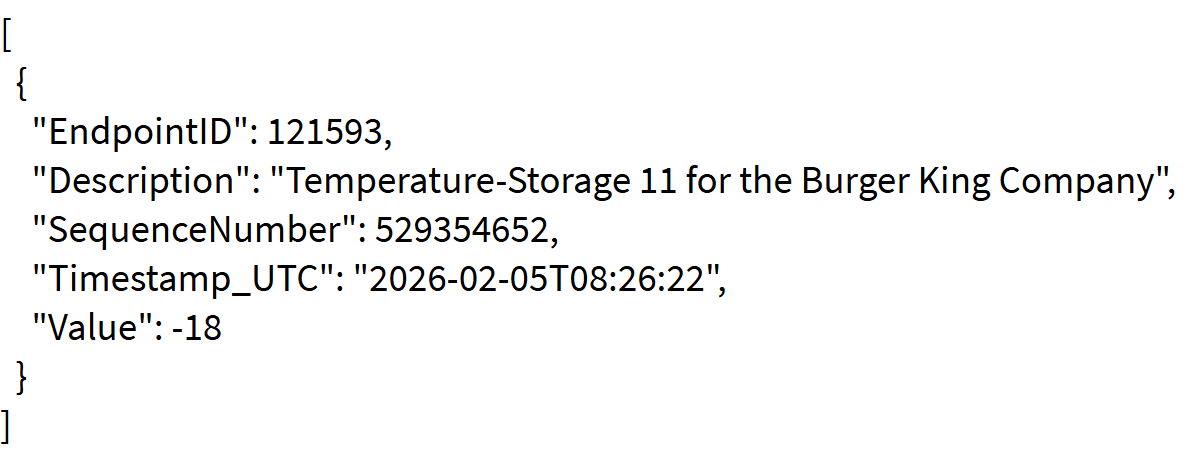
The information in the list is as follows:
- EndpointID: Identification number of the queried sensor
- Description: Name of the queried sensor
- SequenceNumber: Sequential number indicating the order in which data was recorded (useful for tracking/history)
- TimeStamp_UTC: Exact date and time of the lastValue recording
- Value: Last value reported by the sensor
If an endpoint has no data, the Value and timeStamp fields will be null.
Note: The addition of this functionality affects all endpoint data query methods, as they now include the description field.
The Camera endpoint is excluded.
Dernière mise à jour le
Obtenir les données d'un endpoint en utilisant son ID et des paramètres
Cette API permet de récupérer les données d'un endpoint en utilisant son ID et des paramètres. Requête GET...
Obtenir les données d'endpoints de manière incrémentale
Cette API permet de récupérer une liste d'endpoints de manière incrémentale. Cela permet des mises à jour rapides des endpoints sans avoir besoin de récupérer la liste complète.