

Receiving Commands
Commands
Basic command integration flow
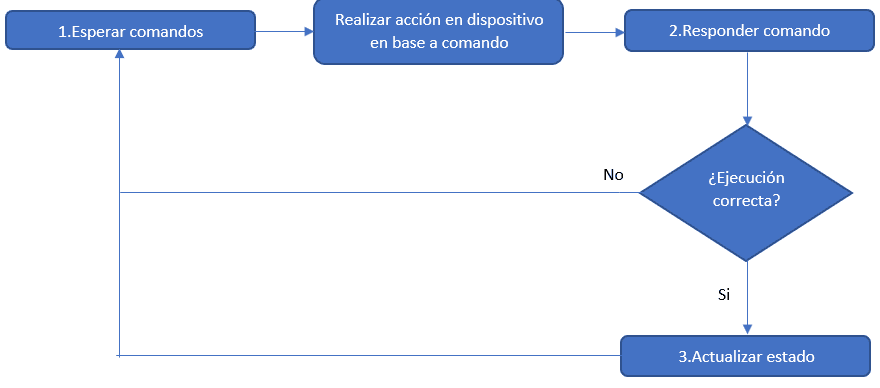
The gateway, device or endpoint must listen for commands by subscribing to this topic: **{client-secure-id}/commands/requests/{device-address}**
- client-secure-id: is the user of the connection. The topic structure starts with the user ID because each user may only use topics that begin with that ID.
- device-address: the value entered in the “address” field when the device was created.
The device must interpret this response, carry out the corresponding actions and reply through the command response method to report whether it ran correctly.
If it ran correctly, call the method that updates the device's state as appropriate.
Finally, make sure the device keeps listening for commands with the first method described.
1. Wait for commands
To listen for commands, a device must subscribe to the topic: {client-secure-id}/commands/requests/{device-address}
- client-secure-id: is the user of the connection. The topic structure starts with the user ID because each user may only use topics that begin with that ID. You can find this value under security > MQTT configuration
- device-address: the value entered in the “address” field when the device was created. For an existing device, you can get it from the device list:

Response
The response is a list inside the WaitForCommand_EndpointResult property, with one entry per command:
{
    "Closure":null,
    "CommandID":1120907993,
    "CommandType":1,
    "Custom":null,
    "DeviceID":7246,
    "Dimmer":null,
    "EndpointID":113139,
    "Management":null,
    "OnOff":{
        "AutomaticOverrideMinutes":0,
        "CommandType":0
    },
    "Thermostat":null
}
For more information about the response properties, see the documentation
Depending on the command type, read the matching property to know which action to perform.
For example, if CommandType is 1, the command is for an "Appliance" endpoint, so read the value reported in the property OnOff
The available command types are listed in this documentation.
2. Respond to a command
After receiving a command and carrying out the corresponding actions on the device (hardware), respond to the command, whether it succeeded or failed.
To report that the command was executed, publish to the topic {client-secure-id}/HttpApi/DeviceIntegration with the following payload:
{
   "accessToken":"xxxxxxxxxxxxxxxxxxxxxxxxxxxxxxxxxxxxxxxx",
   "mqttMethod":"RespondCommand",
   "mqttRID":"c392",
   "response":{
      "CommandID":1120907993,
      "ResponseType":0,
      "ResponseData":"ok",
      "ErrorCode":"1",
      "ErrorMessage":""
   }
}
Payload fields:
| Name | Description | Data Type |
|---|---|---|
| accessToken | Access token with permissions to update endpoint information. See this page for more information. | text |
| mqttMethod | Service method to call. For commands it must always be RespondCommand. | string |
| mqttRID | Optional request identifier, used to get a confirmation response. | string |
| response | Object with the command response | object |
Fields of the “response” sub-object:
| Name | Description | Data Type |
|---|---|---|
| CommandID | Must match the one received on the {client-secure-id}/HttpApi/DeviceIntegration topic subscription (step 1). | integer |
| ResponseType | Must be one of the enum values, as appropriate. Here it is 0, which means "success". | integer |
| ResponseData | Informational text about the command | string |
| ErrorCode | Error code, only valid when ResponseType is Error. | string |
| ErrorMessage | Error message, only valid when ResponseType is Error. | string |
For more information about the “response” object, see the documentation.
3. Update the endpoint state
If the command ran successfully, report the endpoint's new state. To do so, use the matching method for the endpoint type (see “Integration by sensor type”).
Following the appliance example, publish to the topic {client-secure-id}/HttpApi/DeviceIntegration with the following payload:
{
	"accessToken": "xxxxxxxxxxxxxxxxxxxxxxxxxxxxxxxxxxxxxxxx",
	"endpointID": 113139,
	"isOn": true,
	"mqttMethod": "UpdateApplianceStatus",
	"mqttRID": "tkrs34"
}
For more information about this method, see the section on on/off appliances
Last updated on