

Get the latest data from multiple Endpoints
This service allows querying the latest recorded data from up to 5 devices at the same time, using a single call.
Its use is primarily recommended when you need to display real-time information from multiple sensors simultaneously, avoiding a specific call for each one, resulting in time savings and reduced network traffic.
To use this function, make a call to the API through a specific address using the GET method.
GET /api/v2/endpointData/multiple
For security purposes, an access key identifying the requesting user is required. This key is the Access Token and must be included as part of the address.
GET https://gear-dev.cloud.studio/api/v2/endpointData/multiple?accessToken=123456789-1110-0022-3333-987654321012&endpointIds=351031,151040,252340,511088,720510If the access key is missing or invalid, the API will return an error. This error is 401, indicating unauthorized access.
The required parameters are:
- Access Key (Access Token): Key identifying an authorized user.
- It is a String type and is mandatory.
- EndpointsIDs: IDs of the device sensors separated by commas, for which data should be retrieved.
- It is a List type and is mandatory.
- NOTE: The limit of endpoints per call is 5 (five).
When more than 5 endpointIds are sent in the request, a 400 error will be received, indicating Bad Request, meaning the endpoint limit has been exceeded.
Once the request is correctly made, a list of objects (JSON) is received. Each object in the list will represent the information of one of the requested sensors.
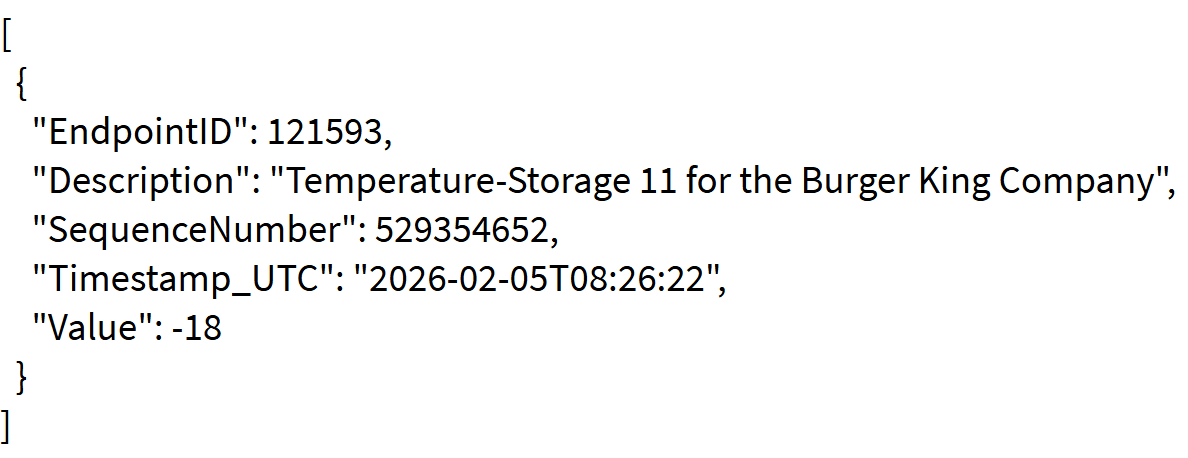
The information in the list is as follows:
- EndpointID: Identification number of the queried sensor
- Description: Name of the queried sensor
- SequenceNumber: Sequential number indicating the order in which data was recorded (useful for tracking/history)
- TimeStamp_UTC: Exact date and time of the lastValue recording
- Value: Last value reported by the sensor
If an endpoint has no data, the Value and timeStamp fields will be null.
Note: The addition of this functionality affects all endpoint data query methods, as they now include the description field.
The Camera endpoint is excluded.
Last updated on